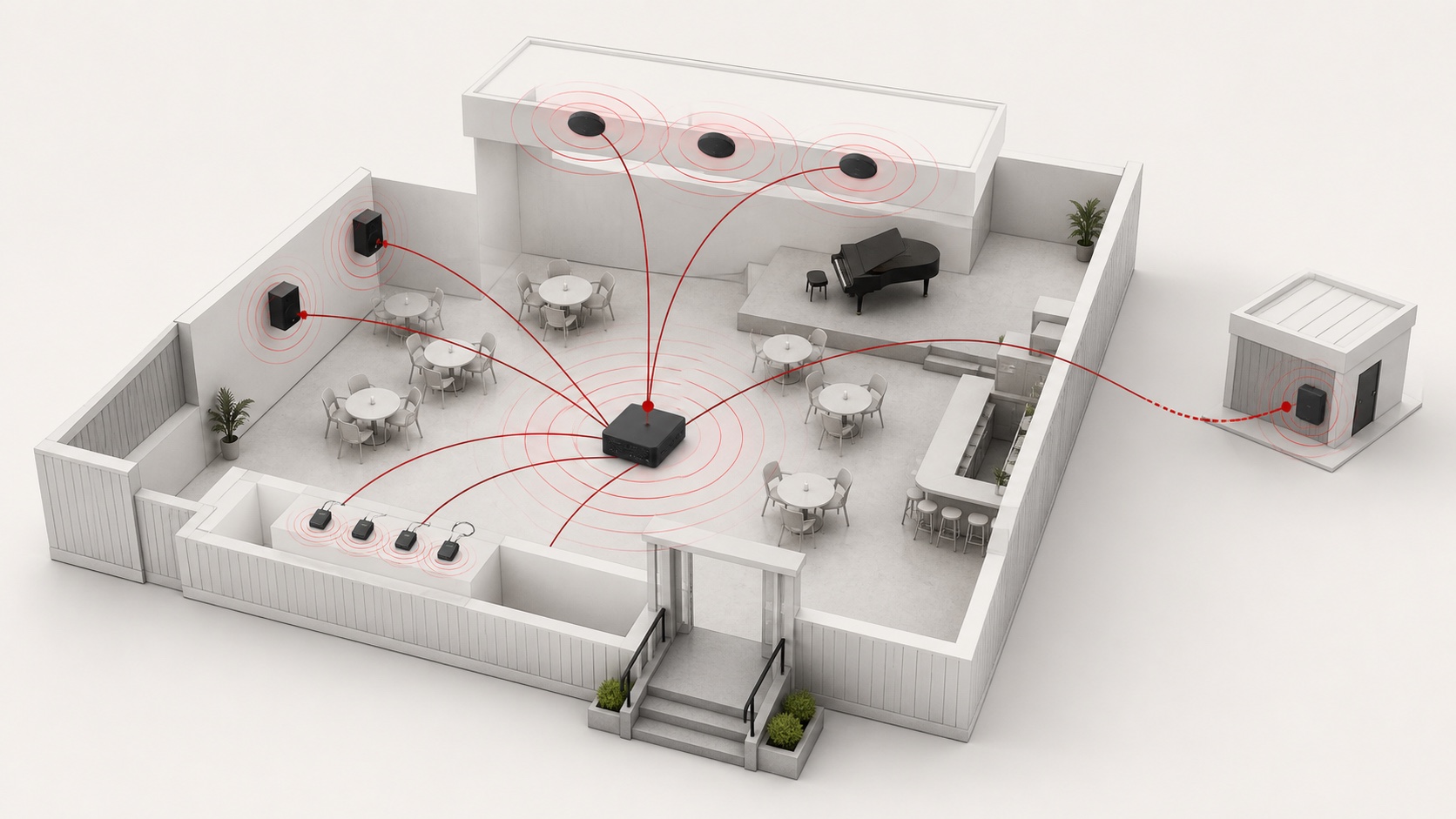
A wireless audio project should begin with the listening task, not the advertised range of a transmitter. A reliable layout defines who needs to hear what, where they need to hear it, what happens when a link fails, and which functions must remain available locally.
This guide is for commercial music, presentation and visitor-listening systems. It is not a substitute for an approved, supervised emergency or life-safety system.
1. Draw the listening zones before selecting equipment
Mark each area on the floor plan and give it one clear job:
| Zone type | Typical requirement | Design question |
|---|---|---|
| Background-music zone | Consistent local programme | Does this zone need independent volume or source selection? |
| Presentation zone | Low-delay speech and video sync | Can the presenter connect quickly without disrupting other zones? |
| Visitor-listening zone | Personal listening or assisted listening | How will users discover, join and receive the stream? |
| Temporary zone | Events, overflow or pop-up use | What is the fastest safe setup and wired fallback? |
| Critical communication zone | Approved, supervised communications | Which certified system owns this function? |
Also mark concrete walls, metal shelving, lift shafts, kitchens, equipment rooms, power locations and available network points. These details affect coverage and recovery much more than an open-space distance estimate.
2. Give wireless a specific role in the signal path
Wireless is most dependable when it solves one defined connection rather than silently carrying every function in a building.
| Requirement | Suitable wireless role | Practical fallback |
|---|---|---|
| Local music from a phone or tablet | Classic Bluetooth near the source | Local wired input or stored programme |
| Visitor listening in a venue | Auracast-capable broadcast with compatible receivers | Installed PA, loan receivers or clear alternate instructions |
| Presenter microphone | Professional RF system designed for the room | Wired microphone |
| Fixed multi-zone programme | Managed network audio or wired distribution | Local source and manual zone control |
| Remote programme source | Network or cellular connection | Local playlist or scheduled programme |
Do not assume that a product labelled “Bluetooth” supports Auracast. Auracast requires compatible LE Audio broadcast features in both the transmitter and receiving devices. Confirm the exact transmitter, receiver, joining method and any access controls before specifying it.
3. Place equipment by measured reception, not by the plan alone
Run a site survey with representative devices after the first layout is prepared. Test at the centre and edge of every intended listening zone, near entrances and partitions, during busy periods if possible.
Check more than whether sound is present:
- Connection and reconnection time after a device leaves and returns.
- Audio stability while doors open, crowds move and nearby equipment operates.
- Whether two nearby zones can be named, selected and controlled without confusion.
- Relationship between the wireless audio delay, video and the installed PA system.
- How staff can identify the active source and restore it after an interruption.
Avoid treating adjoining spaces as one coverage area unless they genuinely share the same programme, controls and failure behaviour.
4. Plan coexistence and operational ownership
Commercial spaces already contain Wi-Fi access points, dense client devices, wireless microphones, point-of-sale equipment and electrical noise sources. List the wireless and network systems already in the space before finalising locations.
For networked audio, document the traffic path, network ownership, device-management access, restart sequence and acceptable delay. For radio systems, document the frequency plan, antenna locations, battery process and the person responsible for daily checks. The goal is not to eliminate every interruption; it is to make recovery predictable.
5. Keep power, fallback and emergency functions separate
Wireless signal delivery does not remove the need for power, amplification, loudspeakers or local control. A hybrid installation often works best: use the installed system for the core programme and add wireless only where it creates a clear operational benefit.
If wireless and loudspeaker feeds serve the same audience, test their relative delay. If an emergency function is required, keep it on the approved system rather than relying on a consumer wireless path.
6. Commission recovery, not only sound quality
Before handover, test the system as staff will actually use it:
- Switch the source off and on, then confirm the expected reconnect behaviour.
- Interrupt the wireless link and verify the fallback source or staff procedure.
- Power-cycle each relevant device and document the restoration order.
- Confirm zone names, access rules and staff controls are understandable.
- Record successful test points, device locations and a short troubleshooting path.
Three practical layout examples
Small café music system. Place an RX-331 or CSB-200B close to the local amplifier input, keep a wired input available for the manager, and do not promise whole-building Bluetooth coverage through service rooms and masonry walls.
Museum visitor listening. Keep the installed PA responsible for public announcements. Where personal listening is needed, design an Auracast-compatible transmitter and receiving journey around signage, receiver availability, access rules and on-site testing.
Multi-zone retail space. Use managed wired or networked distribution for the permanent programme and zone volumes. Reserve wireless connections for temporary displays or local staff use, so a visitor device cannot become the building-wide source by accident.
Information to prepare for a design review
Share the floor plan, intended zone functions, audience size, construction details, existing wireless/network equipment, source types, control permissions, power locations and required fallback behaviour. This lets an integrator choose a realistic system architecture instead of adding wireless after the installation is already constrained.
For the technology decision itself, read How to Choose a Wireless Broadcast System. For the trade-offs between permanent cabling and wireless links, read Wireless vs Wired Audio Systems.
FAQ
Is a wireless audio system easier to install?
It can reduce a particular cable run, but it still needs power, placement, commissioning, control and a recovery plan. In a permanent multi-zone project, those requirements can outweigh the saved cable route.
Can Bluetooth cover a whole venue?
Only after site testing proves the required reception and behaviour. Classic Bluetooth is generally best treated as a local source connection, not a building-wide distribution method.
Should wireless replace an emergency paging system?
No. Keep emergency and life-safety functions on the approved supervised system required for the project.